








SSL Certificate Validity Reduction: What to Know for 2026


SSL certificate validity reduction, The 47-Day Countdown
Imagine renewing every identification document you have every 6 months. That’s the new reality facing web administrators.
If you have been on the internet for a while, you know that this isn’t the first time SSL lifespans have been slashed. Before 2015, you could issue a certificate with a validity of up to 5 years. It was incredibly convenient—a true “set it and forget it” task. But as cyber threats evolved, that convenience became a security liability.
To limit the window of time hackers have to exploit compromised certificates, the industry began aggressively shrinking their lifespans:
- 2015: The maximum validity of an SSL certificate was reduced to 3 years.
- 2018: It was cut down again to just 2 years (825 days).
- 2020: Major browsers forced the industry to the 398-day limit (roughly 1 year) we use today.
For years now, we have been enjoying the comfort of the 398-day SSL certificate lifespan. You could renew once a year, basically “setting it and forgetting it”. But unfortunately, for developers and web admins, those days are coming to an end.
Following a decisive vote by the CA/Browser Forum, the maximum validity of SSL certificates will be aggressively slashed over the coming months, ultimately reaching a hard limit of just 47 days by March 2029.
While 2029 seems far away, the actual changes will begin rolling out immediately this March.
The CA/B Forum isn’t waiting three years to make changes. They are aggressively shortening lifespans in steps, starting right now.
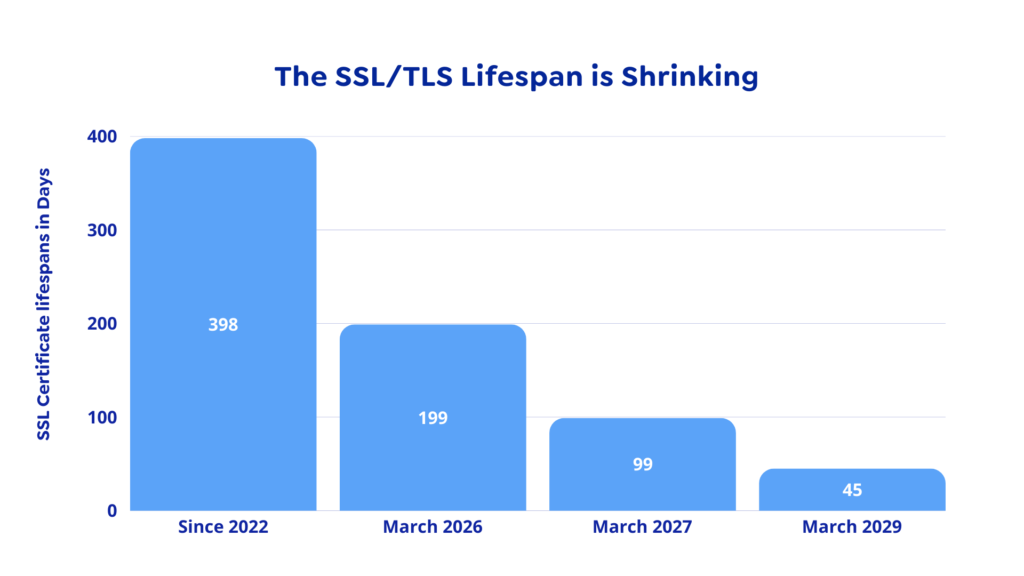
- March 15, 2026 (Next Month): Validity drops to 200 days, cutting off 198 days.
- March 2027: Validity drops to 100 days.
- March 2029: Validity drops to 47 days.
Dangers of “Zombie” Certificates
You might be wondering, why the change? Why fix what isn’t broken?
And the sad truth is, long-lived certificates pose a huge security risk: if your private key is compromised, hackers can effectively impersonate your website, decrypt your traffic, and spoof your identity for the entire remaining lifespan of the certificate. It’s basically a hacker’s paradise.
This isn’t theoretical. It has happened to the world’s biggest companies.
In 2022, a hacking group stole two code-signing certificates from NVIDIA. Even though the certificates were old and expired several years ago, they were still valid enough to trick Windows. Hackers immediately started using them to sign malware, making it appear as legitimate NVIDIA drivers to bypass antivirus checks. While that incident involved software signing, the exact same “Zombie” flaw applies to the SSL certificates protecting your website.
In a perfect world, we would just “cancel” (revoke) those stolen keys immediately. But as the NVIDIA incident proved, revocation is a slow, broken process. Microsoft had to rely on cumbersome “Certificate Revocation Lists” (CRLs) and push full Windows updates just to stop the malware. Until those updates hit, the hackers had free rein.

It is precisely this “revocation lag” that Apple cites as the primary driver for the shift to 47 days.
In the ballot proposing the 47-day change, Apple argued that the current systems for revoking bad certificates (CRLs and OCSP) are fundamentally unreliable for two main reasons.
- Browsers Ignore Them: To speed up web browsing, many browsers simply skip checking the “Revocation List” entirely. If a certificate is revoked but the browser doesn’t check for revocation, the user is still vulnerable.
- The “Trust Decay”: Apple argues that the information in a certificate becomes “less trustworthy” every single day it exists. A domain owner might change, or a key might be stolen (as happened with NVIDIA’s).
The bigger picture: By shrinking the certificate lifespan to 47 days, the industry is essentially mandating “Crypto-Agility.” This capability is critical; as we get closer to practical quantum computing, the threat to asymmetric encryption becomes imminent. We must adopt techniques that make changing encryption parameters a manual headache rather than an automated, seamless process.
But, hold on, does that mean i have to manually renew my SSL certificate every 7 weeks?
Well, that question largely depends on your setup and the tool stack you are using. Because each hosting environment has its own configuration and access limitations, renewal and installation processes will vary:
- Free Certificates (Let’s Encrypt): If you rely on free SSL certificates, providers like Let’s Encrypt use the ACME protocol to completely automate the process. By installing a free client (like Certbot or acme.sh) on your server, the software will automatically validate your domain, fetch the new certificate, and install it in the background before the old one expires.
- Paid/Premium Certificates: If your business purchases premium certificates from commercial CAs (like DigiCert), manual renewal is still a thing of the past. These providers now fully support the ACME protocol and offer enterprise Certificate Lifecycle Management (CLM) platforms. You essentially buy a 1-year “subscription,” and their CLM agents automatically rotate and deploy short-lived certificates to your servers in the background.
Learn more from our Knowledge base
Share:










Leave a Reply